Phuket to Ao Nang: Ferry or Speedboat Guide
- Crossing time 1h 10m–3h
- Operators 5
- Departures a day 8
850+ THB
Schedules & prices


 Pick-Up
 Drop-Off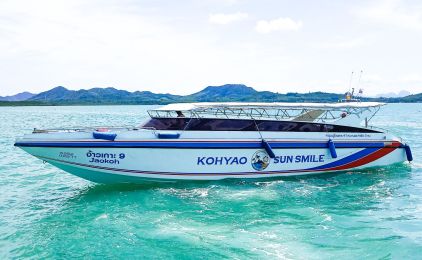






This trip is not available during the selected dates
Navigate the Sea: Phuket to Ao Nang by Ferry or Speedboat

Embark on a memorable journey from the island of Phuket to the tranquil shores of Ao Nang. It is a must-do for any traveler exploring Thailand's Andaman Sea. This guide aims to streamline your travel planning. It details everything from Phuket to Ao Nang by speed boat or ferry.
Whether you're charting a course for adventure or leisure, we've compiled essential Phuket to Ao Nang schedule and price information to ensure a seamless experience. Let's set sail on this journey together, navigating through the beauty that lies between Phuket and Ao Nang.
Phuket to Ao Nang Schedule and Pricing
The journey from Phuket to Ao Nang presents travelers with two appealing options: the exhilarating speed of a boat or the panoramic vistas of a ferry ride. These options cater to different preferences and allow for a tailored travel experience through the Andaman Sea's splendor.
Departure Details:
By Ferry: The ferry service, operated by Ao Nang Travel and Tour Co.,Ltd., offers a daily departure time from Rassada Pier to Nopparat Thara Pier. This route is not just a mode of transportation; it's a scenic trip worth taking for the views alone.
By Speedboat: For those eager to reach their destination quickly, Phuket to Ao Nang by speed boat service, facilitated by Green Planet and Koh Yao Sun Smile, offers flexibility with multiple departure times throughout the day.
Pricing Information:
Ferry Ticket: At a cost of THB 600 ($17), the ferry provides a cost-effective and visually rewarding option for traveling from Phuket to Ao Nang.
Speed Boat Combo Ticket: With prices ranging from THB 1000 to 1190 ($28 to $34), this option accelerates your journey, making it ideal for those with a tight schedule.
Check-in Instructions:
To ensure a hassle-free departure, we recommend booking your ticket in advance and arriving at least 30 minutes before your scheduled leave. Ferry passengers will check in at Rassada Pier, while speedboat travelers will receive specific check-in details upon booking.
Important Travel Information
- The journey covers a distance of 27 miles (42 km), offering a gateway to exploring the Andaman Sea, including the renowned Phi Phi Islands and the gateway to Krabi Town.
- Travel Time: Expect the ferry to take about 2 hours, with speedboats varying from 1h 20m to 2h 40m, depending on weather conditions and specific routes.
- Daily Departures: Ferries depart at 8:30 am, with speedboats offering more flexible departure times at 9:30, 11:00, and 15:00.
Choosing a ferry for your Phuket to Ao Nang journey offers more than just transport. It is an opportunity to soak in the breathtaking scenery of the Andaman Sea. It makes stops at picturesque locations like Phi Phi on the way. However, it's crucial to consider personal comfort, especially for those susceptible to seasickness. Advance booking your ticket is wise to avoid disappointment during peak travel seasons.
Traveling from Phuket to Ao Nang, whether you choose the fast speed boat or the picturesque ferry ride, stands out as a must-do experience in Thailand's Andaman region. Our detailed guide, which includes everything you need to know about the Phuket to Ao Nang schedule and price.
It includes essential tips for booking your ticket and organizing your trip. It ensures you are fully equipped to discover the stunning sights between Phuket and Ao Nang. Get ready to dive into both the excitement and tranquility of the Andaman Sea.
Frequently asked questions
Do I need to print my ferry ticket or is mobile ok?
You don't need to print your ticket. Your boarding voucher is in your account: open Bookings, then View trip details, and click Download PDF. On the day of travel, show the QR code on it — on your phone is fine — to the ferry operator staff at the pier named on your ticket, and they will direct you to your boat.
If you'd prefer paper, print the PDF yourself.
What happens if my ferry is cancelled due to weather?
We are sorry when weather stops a sailing. Ferries usually run in rain; speedboats are more often stopped by rough seas.
If your trip is cancelled because of weather, your booking in Bookings shows a message once our team has confirmed the cancellation. You can then either move to the next available service with Change this booking, or cancel with Cancel & refund for a full refund.
If the sailing is running but you choose not to travel, the normal cancellation policy applies.
Why is my account locked?
We lock an account for a short time after several failed sign-in attempts in a row. It is an automatic safety measure: it stops someone else guessing your password, and it happens whether or not the person typing was you.
You do not need to contact us. The lock lifts on its own — see How long am I locked out for?
What is the difference between a locked and a blocked account?
Locked is automatic and temporary. It happens after repeated failed sign-in attempts and it lifts by itself — within a minute in most cases.
Blocked is a decision made by our team, and it does not lift on its own. If your account is blocked you will need to contact us; waiting will not change it, and neither will resetting your password.
If you are not sure which applies to you, get in touch and we will tell you.
How do I unlock my account now?
Wait, and try again. Every lock lifts on its own — a minute the first time, and never more than an hour however many attempts have failed. There is nothing to click and nobody to contact.
If you have forgotten your password, do not keep guessing: each wrong attempt makes the next wait longer. Use Forgot password instead. Resetting your password gets you straight back in.
My account locked but I never tried to sign in
Then someone else was trying to sign in as you, and the lock did its job — it stopped them.
Your account is safe: a lock means the attempts failed. Nobody got in. You do not have to do anything, and the lock will lift on its own.
We would still recommend two things:
- Change your password, especially if you use the same one on another website.
- Add an authenticator app in your account security settings, so a password alone is never enough to sign in as you.
If you get these repeatedly, contact us and we will look into it.